1 Tb Firebird database: preliminary report
Dmitry Kuzmenko, last update 31-03-2014
Translations of this document: Portuguese Russian Chinese
Read our article about even bigger (1.7 Terabyte) database: More Details About 1.7 Terabyte database.
Why to create terabyte Firebird database?
Many companies work with big Firebird databases and rely on them to support important business operations. Some of Firebird databases are already hundreds of gigabytes in size and continue to grow (see “Who’s Big?” section), and it’s easy to predict the moment when they become 2, 3 or 5 times bigger. So database administrators and vendors are interested to investigate Firebird behaviour with big databases and get some recommendations how to manage them.
Also the important reason we had in mind while creating 1Tb Firebird database was the final elimination of prevalent perception of Firebird as database engine for “small databases”. This myth seems to be dead now, but some analysts and journalists raise it from the grave regularly, and we hope to finish with this ridiculous perception at last.
| ## Hardware |
Firebird is well-known for its incredible scalability and this investigation has confirmed it once again. The initial purpose of this experiment was just creation of Firebird database 1Tb in size, so we used usual desktop computer:
Table 1: Hardware
| Component | Parameters |
| CPU | AMDAthlon 64 x2 5200 |
| RAM | 4GB |
| Motherboard | MSI K9N Platinum |
| HDD1 (operation system and temp) | ST3160815AS, 160GB, SATA II |
| HDD2 (auxilary) | HDT721064SLA360, 640GB,SATAII |
| HDD2 (auxilary) | HDS728080PLA380, 80GB, SATA I |
| HDD3 (database) | ST31500341AS, 1.5TB, SATA II (Firmware CC1H) |
In essence, we’ve put the 1.5Tb HDD into the one of our office desktops, without any other modifications. This HDD was formatted with cluster size 16Kb (the same as page size of database, as you can see below).
Software
As it’s a desktop computer, operation system is Windows XP Professional SP3, 32bit. To actually perform the test we used the loader from TPC-based toolkit (download it from http://ibdeveloper.com/tests/tpc-c/, both binaries and sources are available).
We’d like to emphasize that loader inserts data as it would be inserted in real life scenario: records are being inserted and situated inside database (and at physical disk areas) into several master-detail-subdetail tables, not table by table.
Table 2: Software
| Software | Version |
| Operation system | Windows XP Professional SP3, 32bit |
| Firebird | 2.1.3 SuperServer (snapshot) |
| Loader | Custom loader from tpc-based test |
Plan
We had very straightforward plan for this experiment:
- Create database and load it with 1Tb data, without indices
- Create primary keys and appropriate indices (so actually database size is more than 1Tb)
- Gather database statistics
- Run several SQL queries and estimate database performance
Database and Firebird server configuration
Database has page size 16384 bytes, the same as HDD cluster, to maximize disk throughout performance (to read/write 1 page at one I/O cycle).
In the Firebird configuration we have configured additional directory for temp space and point it to the disk with 640Gb (where ~300Gb was free).
Loading step
Data were loaded into this database by several steps. Computer was used during loading operations as usual desktop (we have MS Office, Firefox, IBAnalyst, etc - about 8-12 programs ran at the same time). If we would dedicate the hardware for this task only, probably it would be faster, so please consider these values only as a low-end example; they are definitely not the top results.
Table 3: Loading operations
| |
| Description | Value |
| Time to load | ~70 hours |
| Total records inserted | 6.2 billions |
| Average insertion speed | 24500 records/second |
| Average record size | 146 bytes (min 13 bytes, max - 600 bytes) |
| Transactions | 646489 |
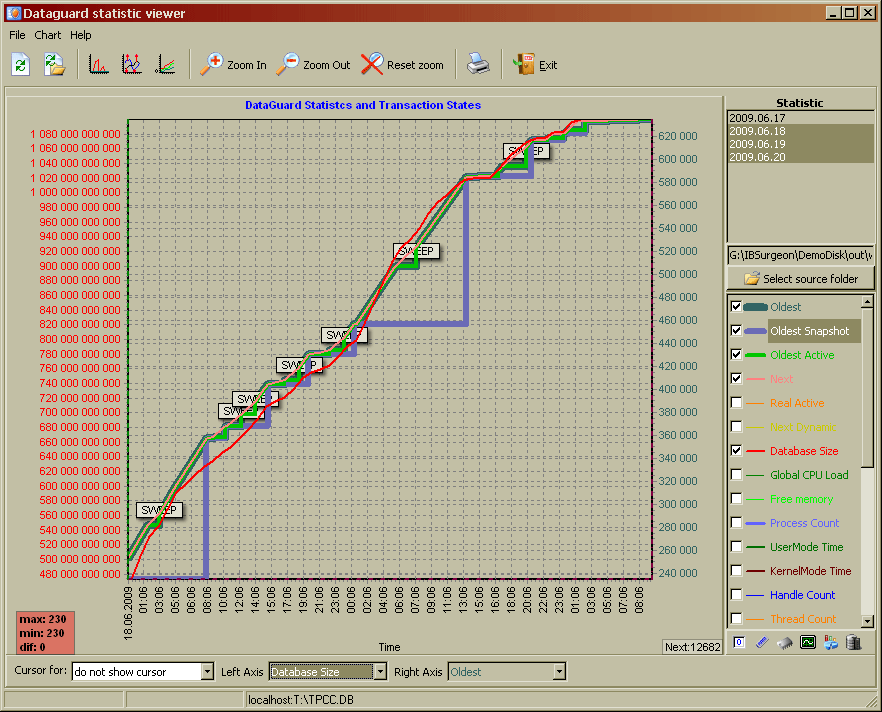
We spent ~4 days at loading, and after that we had Firebird database with exactly 1Tb size (i.e. 1 099 900 125 184 bytes).
Below you can see database growth and transactions dynamics in FBDataGuard Viewer:
Indices
We created indices one by one and counted their creations’ time and appropriate size of temp file used for sorting.
The biggest index was created for table ORDER_LINE. Its primary key contains four fields (Smallint, Smallint, Integer and Smallint). Temp file for this sorting index was 182Gb, and final index size in the database is 29.3Gb.
It’s interesting to see that even index for table with 3.8 billion records has depth = 3, because page size was 16384 bytes, so there is no overhead while searching data using primary key for this table.
Statistics
After that we have gathered database statistics. It took 7 hours 32 mins 45 secs.
We’ve put key statistics information into the one table and included some queries and time measurements:
Table 4: Consolidated statistics for 1Tb database
| Table name | Record counts | Size, gb | Execution time of select count(*) | Index creation time | Tmp file size, Gb | Index size, Gb |
| WAREHOUSE | 1240 | 0.002 | 0s | 0 | 0 | 0.0 |
| ITEM | 100000 | 0.012 | 0.7s | - | - | 0.0 |
| DISTRICT | 124000 | 0.017 | 0.7s | 6 | - | 0.0 |
| NEW_ORDER | 111600000 | 32 | 20m 00s | 23m 00s | 4.56 | 0.8 |
| CUSTOMER | 372000000 | 224 | - | 41m 00s | - | 2.6 |
| customer_last | 1h 52m 32s | 12.4 | 2.3 | |||
| fk_cust_ware | 2h 10m 51s | - | 2.3 | |||
| HISTORY | 372000000 | 32 | - | - | - | - |
| ORDERS | 372000000 | 25 | 32m 00s | 45m 41s | 15.2 | 2.5 |
| STOCK | 1240000000 | 404 | - | 3h 34m 44s | 41.5 | 9.2 |
| ORDER_LINE | 3720051796 | 359 | - | 12h 6m 18s | 182.0 | 29.3 |
Database statistics can be downloaded from here.
You can use free FBDataGuard Community Edition Viewer to interpret text data and see not only database performance metrics, but also CPU and memory consumption.
Queries
First of all, we’ve run select count(*) queries on several tables (see 4-th column in Table 4 above). As you know, due to the multi-version nature of Firebird select count(*) for whole table is an expensive operation for server because it requires visiting of every page, and experienced Firebird developers does not use select count(*), but we used it to demonstrate the overall performance ratio of database and hardware.
After select count queries we have run queries from real-life scenario and, to be honest, we were amazed with so good results. See for yourself:
| Query | Statistics | Description |
| select w_id, w_name, c_id, c_last from WAREHOUSE, customer where c_w_id = w_id |
PLAN JOIN (WAREHOUSE NATURAL, CUSTOMER INDEX (FK_CUST_WARE)) ------ Performance info —— Prepare time = 15ms Execute time = 79ms Avg fetch time = 6.08 ms Current memory = 272 264 476 Max memory = 272 514 048 Memory buffers = 16 384 Reads from disk to cache = 82 Writes from cache to disk = 0 Fetches from cache = 3 648 |
Simple join of tables with 12400 and 372000000 records, no WHERE conditions. “Avg fetch time = 6.08 ms” is for fetching the first row. |
| select w_id, w_name, c_id, c_last from WAREHOUSE, customer where c_w_id = w_id and c_w_id = 10000 |
PLAN JOIN (WAREHOUSE INDEX (WAREHOUSE_PK), CUSTOMER INDEX (FK_CUST_WARE)) ------ Performance info —— Prepare time = 16ms Execute time = 78ms Avg fetch time = 6.00 ms Current memory = 272 266 148 Max memory = 272 514 048 Memory buffers = 16 384 Reads from disk to cache = 88 Writes from cache to disk = 0 Fetches from cache = 3 656 |
Join of the same tables with condition which forces selection of recent records. “Avg fetch time = 6.00 ms” is for fetching the first row. |
| select count(*) from WAREHOUSE, customer where c_w_id = w_id and c_w_id = 10000 Result = 30000 |
PLAN JOIN (WAREHOUSE INDEX (WAREHOUSE_PK), CUSTOMER INDEX (FK_CUST_WARE)) ------ Performance info —— Prepare time = 0ms Execute time = 453ms Avg fetch time = 453.00 ms Current memory = 272 263 844 Max memory = 272 514 048 Memory buffers = 16 384 Reads from disk to cache = 1 048 Writes from cache to disk = 0 Fetches from cache = 60 024 |
Count records for previous query |
| SELECT * FROM ORDER_LINE WHERE OL_W_ID = 500 |
Plan PLAN (ORDER_LINE INDEX (ORDER_LINE_PK)) ------ Performance info —— Prepare time = 0ms Execute time = 94ms Avg fetch time = 7.23 ms Current memory = 136 445 536 Max memory = 136 592 176 Memory buffers = 8 192 Reads from disk to cache = 150 Writes from cache to disk = 0 Fetches from cache = 2 402 |
Query to the biggest table (3.8B records). “Avg fetch time = 7.23 ms” is for fetching the first row. |
<br>Plan<br><br>PLAN (ORDER_LINE INDEX (ORDER_LINE_PK))<br><br> <br><br>------ Performance info ------<br><br>Prepare time = 0ms<br><br>Execute time = 3s 438ms<br><br>Avg fetch time = 0.01 ms<br><br>Current memory = 136 445 496<br><br>Max memory = 136 592 176<br><br>Memory buffers = 8 192<br><br>Reads from disk to cache = 1 840<br><br>Writes from cache to disk = 0<br><br>Fetches from cache = 598 636<br> |
||
| SELECT * FROM ORDER_LINE WHERE OL_W_ID = 500 |
The same query to the biggest table (3.8B records), but at this time we have fetched all records (299245 records fetched). | |
| select w_id, w_name, c_id, c_last from WAREHOUSE, customer where c_w_id = w_id and (c_w_id > 8000) and (c_w_id < 10000) |
Plan PLAN JOIN (WAREHOUSE INDEX (WAREHOUSE_PK), CUSTOMER INDEX (FK_CUST_WARE)) ------ Performance info —— Prepare time = 0ms Execute time = 125ms Avg fetch time = 9.62 ms Current memory = 272 270 824 Max memory = 272 514 048 Memory buffers = 16 384 Reads from disk to cache = 91 Writes from cache to disk = 0 Fetches from cache = 3 659 |
Join tables with 1240 records and 372M records. |
| select count(*) from WAREHOUSE, customer where c_w_id = w_id and (c_w_id > 8000) and (c_w_id < 10000) Result = 59 970 000 |
Plan PLAN JOIN (WAREHOUSE INDEX (WAREHOUSE_PK), CUSTOMER INDEX (FK_CUST_WARE)) ------ Performance info —— Prepare time = 0ms Execute time = 13m 4s 718ms Avg fetch time = 784 718.00 ms Current memory = 272 268 532 Max memory = 272 514 048 Memory buffers = 16 384 Reads from disk to cache = 2 332 583 Writes from cache to disk = 0 Fetches from cache = 119 977 902 |
Count records for previous query |
Summary
In this experiment Firebird shows the following results
-
Undoubted ability to handle big databases. We are pretty sure that it’s possible to create and use 32 Tb database on appropriate hardware, and Firebird will show the same high performance as it shows for smaller databases (i.e., 1Tb and below).
-
Good scalability and amazingly small footprint. 1Tb database was created at usual desktop computer and, more important, it can be used to perform general queries: if you don’t fetch millions of records, query’s speed is the same as it is for moderate size databases (10-15Gb).
This is not the end of this experiment: we intend to run some queries, gather additional statistics and publish more detailed report shortly. Please stay tuned.
Contacts
Send all your questions and enquiries to [email protected]